
← Knihovna · Průvodce
Agenti — když LLM dostane ruce a paměť
LLM s tool use, smyčkou a pamětí. Spousta marketingu, málo definic. Tady je rovná pravda — a postup, jak agenta postavit s verifikací, aniž by ti spálil rozpočet.
Zlaté pravidlo: Nejdřív workflow, agent až když to jinak nejde. Autonomie není feature, je to náklad — platíš ji tokeny, latencí a nepředvídatelností. Kupuj ji jen pro úlohy, které vyžadují exploraci: neznámá data, neznámé prostředí, neznámý počet kroků.
Co to je
Agent = LLM ve smyčce, který má přístup k nástrojům (search, shell, API) a nějakou formu paměti. Cyklus je tupý:
while not done:
    rozhodni(co dělat) → zavolej tool → přečti výsledek → updatuj plán
To je celé. Všechno ostatní jsou variace. A rovnou co to není: není to vědomí, není to AGI, není to jeden velký prompt. Stav, plán a paměť žijí mimo LLM, v aplikaci — model jen vybírá další akci.
Agent vs. workflow — nejdůležitější rozhodnutí
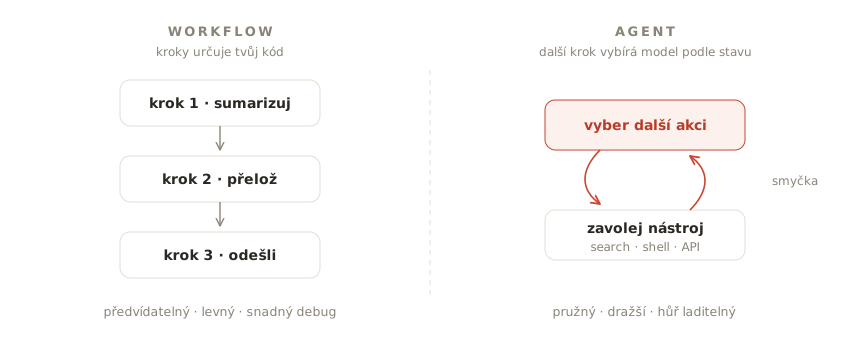
Workflow má kroky předem dané, LLM jen vyplňuje díry (klasické „sumarizuj → přelož → pošli“). Agent si další krok vybírá sám podle stavu. Workflow je předvídatelnější, levnější a snáz se debuguje; agent unese úlohy, jejichž průběh dopředu neznáš. Většina „agentů“ v produkci jsou ve skutečnosti workflow s jedním agentním krokem — a je to tak správně.
Closed-loop: bez verifikace je autonomie jen drahý random walk
One-shot generování (model něco napíše, člověk to doladí) dává krátkodobý pocit rychlosti. Škáluje se špatně. Closed-loop znamená, že agent po akci spustí ověření — test, lint, SQL check, screenshot, CI — a podle výsledku pokračuje nebo opravuje, ideálně bez člověka v každém kroku.
Verifikace není „quality gate na konci“. Je to smysl smyčky. Bez strojového „hotovo“ agent neví, kdy přestat, a ty nevíš, jestli smíš přidat autonomii. U coding agentů to znamená testy a CI dřív než fleet background jobů. U business agentů to znamená assertovatelné podmínky: záznam existuje, e-mail je ve schváleném draftu, částka sedí.
Rychlost agentů není trade-off proti kvalitě. Rychlost je zakódovaná kvalita: evaly, skills, instrukční soubory, úzké tools, logy. Co neumíš spustit automaticky, neumíš škálovat.
Postup: jak agenta postavit, krok za krokem
1. Zkus to bez agenta. Jeden pořádný prompt. Pak pevný workflow. Teprve když úloha vyžaduje rozhodování za běhu, sáhni po smyčce. Každý stupeň níž je řádově levnější na provoz i debugging.
2. Definuj „hotovo“ strojově. Agent potřebuje vědět, kdy přestat: prošly testy, našel se záznam, soubor existuje. Smyčka bez jasné podmínky konce je generátor nákladů. Tohle je jádro closed-loop.
3. Začni s 3–5 nástroji. Méně nástrojů = lepší volby. Každý nástroj má mít popis psaný jako dokumentace pro nového kolegu: co dělá, kdy ho použít, co vrací. Špatné popisy nástrojů jsou nejčastější tichá příčina hloupých agentů.
4. Nastav limity. Maximální počet kroků, token budget, timeout. Agent, který se zacyklí, má skončit chybou, ne spálit rozpočet. K tomu logy každé akce — bez nich nikdy nezjistíš, proč udělal, co udělal.
5. Human-in-the-loop pro nevratné akce. Mazání, platby, deploy, odesílání dat ven — člověk potvrzuje. Autonomii rozšiřuj podle důkazů z logů a success rate, ne podle nadšení z dema.
6. Vrstvi paměť vědomě. Tři vrstvy, které dává smysl rozlišovat: working memory (kontextové okno právě teď), epizodická (co se stalo v minulých bězích — log + sumarizace), sémantická (naučená fakta o doméně — strukturovaný store s lookupem). Jedna „magická“ vrstva paměti neexistuje, to je marketing.
7. Měř success rate a počet akcí na úlohu. Když nevíš, kolik kroků úloha průměrně bere a jak často končí úspěchem, neprovozuješ agenta — doufáš. Eval sada úloh se známým výsledkem je u agentů stejně zásadní jako u RAG. Sleduj i cenu a podíl běhů, které potřebovaly lidský zásah.
Slovníček, ať se neztratíš
- Tool use — formát, kterým model říká „zavolej X s argumenty Y“. U všech velkých providerů vyřešený problém.
- MCP (Model Context Protocol) — standard, jak modelu zpřístupnit nástroje a zdroje (soubory, DB, API) jako pluginy. Ekosystém roste napříč vendory.
- ReAct — původní paper „střídej uvažování a akci“; dnes už jen historické jméno pro agentní smyčku.
- Closed-loop — agent + automatická verifikace ve smyčce, ne one-shot diff a lidský last mile u každého kroku.
Časté chyby a jak je opravit
- Agent na úlohu, kterou zvládne workflow → vrať se o stupeň níž; ušetříš peníze i nervy.
- Žádné limity smyčky → max kroků + budget + timeout, selhání nahlas.
- Příliš mnoho nástrojů → pod 10, ideálně 3–5; zbytek schovej za router, nebo rozděl mezi specializované sub-agenty.
- Žádný human-in-the-loop u nevratných akcí → schvalování; autonomie se zaslouží, ne deklaruje.
- Stav nacpaný do promptu → plán a mezivýsledky drž v aplikaci; do kontextu jen to, co model k dalšímu kroku potřebuje.
- Hodnocení podle dema → demo je vybraný úspěch; rozhoduj podle success rate na eval sadě.
- Autonomie bez verifikace → nejdřív pass/fail signál, pak background běhy a automerge. Jinak jen zrychlíš dluh.
Kdy to nepoužívat
Když umíš úlohu rozepsat do pevných kroků — workflow vyhrává vždycky, když je k dispozici. Když je úloha jednorázová a levnější je udělat ji ručně. A když nemáš jak ověřovat výsledky: agent bez verifikace je jen drahý random walk po tvém systému.
Knihy a zdroje
- Building effective agents (Anthropic) — kanonický text: vzory od promptu přes workflow po agenta a proč jednoduchost vyhrává. Začni tady.
- 12-Factor Agents — praktické principy pro produkční agenty (stav mimo LLM, malé smyčky, vlastnictví kontextu). Vzniklo z bolesti reálných nasazení a je to znát.
- Claude Code: Best practices for agentic coding (Anthropic) — praktiky closed-loop u coding agentů: instrukční soubory, plán, testy.
- AI Engineering (Chip Huyen, O'Reilly 2025) — kapitola o agentech zasazuje smyčku do celku: evaluace, paměť, náklady, kdy agenta vůbec stavět.
- METR — měření, jak dlouhé úlohy agenti reálně zvládají bez dozoru. Protijed na marketingové sliby o „plně autonomních kolezích“.
Co si pamatovat
Agent je tupá smyčka okolo chytrého modelu — a většina problémů, které lidi přisuzují modelu (zacyklení, ztracený kontext, hloupé rozhodnutí), jsou chyby té smyčky. Stavěj od nejjednoduššího: prompt → workflow → agent. Definuj hotovo strojově, omez nástroje i kroky, loguj všechno a autonomii dávkuj podle dat. Bez verifikace nekupuješ agenta. Kupuješ generátor akcí.